The internet is entering a new era. For more than two decades, Google Search has been the primary gateway to online information. Whether users wanted to find a website, compare products, research a topic, or solve a problem, Google has been the first stop for billions of people worldwide.
However, artificial intelligence is transforming the way we interact with the web. Instead of displaying a list of blue links, a growing number of AI browsers can understand questions, summarize web pages, compare information from multiple sources, and even complete tasks on behalf of users.
This shift raises an important question:
Can AI browsers eventually replace Google Search?
Let’s explore how AI browsers work, why they’re gaining popularity, and what their rise means for the future of the internet.
What Are AI Browsers?
AI browsers combine traditional web browsing with advanced artificial intelligence. Instead of acting as a simple gateway to websites, these browsers function as intelligent assistants that help users understand information and complete tasks more efficiently.
Unlike conventional browsers that require users to search, open multiple tabs, and compare information manually, AI browsers can process complex requests and provide direct answers while still allowing users to access the original sources.
Common AI browser capabilities include:
- AI-powered search
- Instant page summaries
- Writing assistance
- Content translation
- Research support
- Smart tab organization
- Voice interaction
- Task automation
- Context-aware recommendations
These features are designed to save time and reduce information overload.
Why AI Browsers Are Growing So Quickly
Several factors are driving the rapid adoption of AI browsers.
Faster Information Retrieval
Traditional search often requires opening multiple websites before finding the right answer.
AI browsers simplify this process by analyzing relevant content and presenting concise summaries.
For example, instead of reading ten different articles about a new smartphone, users can receive a well-organized overview in seconds.
Better Productivity
Many AI browsers assist users with everyday tasks such as:
- Writing emails
- Summarizing documents
- Explaining technical concepts
- Comparing products
- Organizing research
- Drafting reports
This turns the browser into a productivity tool rather than just a window to the web.
Personalized Experiences
Modern AI systems can understand user preferences over time.
This allows AI browsers to:
- Recommend relevant content
- Organize bookmarks intelligently
- Suggest useful websites
- Improve search results based on context
- Reduce repetitive searching
How AI Browsers Differ from Google Search
Google Search is built around indexing billions of web pages and ranking them based on relevance.
AI browsers focus on understanding the user’s intent.
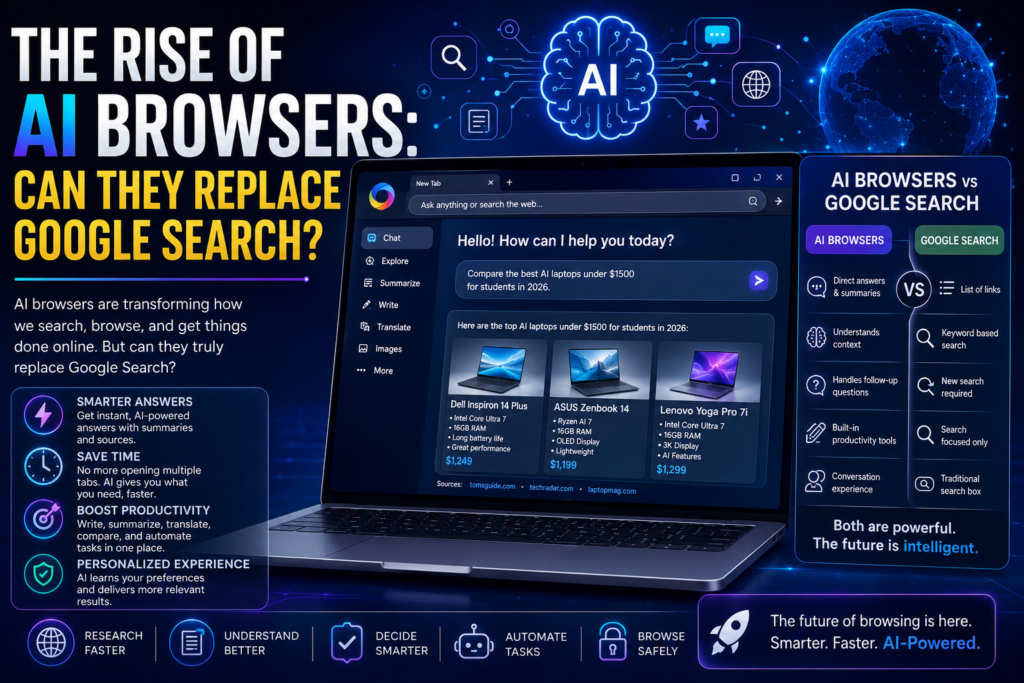
| Google Search | AI Browsers |
|---|---|
| Returns links | Provides direct answers |
| User compares websites | AI summarizes multiple sources |
| Keyword-focused | Conversation-focused |
| Multiple searches often required | Handles follow-up questions naturally |
| Mostly search | Search + productivity + automation |
This difference represents one of the biggest shifts in internet history.
Popular AI Browsers in 2026
Several companies are investing heavily in AI-powered browsing experiences.
Some of the leading AI browsers and platforms include:
- AI-integrated versions of Microsoft Edge
- Opera’s AI-powered browser features
- Brave with built-in AI assistant
- Arc Browser with intelligent workspace features
- AI-first browsing startups
Competition in this space continues to grow rapidly as browser makers race to redefine how people access online information.
The Advantages of AI Browsers
1. Saves Time
Instead of reading multiple articles, users receive quick summaries with links for deeper exploration.
2. Reduces Information Overload
The internet contains an overwhelming amount of information.
AI helps identify the most relevant content while filtering unnecessary details.
3. Better Research
Students, professionals, and content creators can:
- Compare sources
- Generate summaries
- Organize notes
- Discover key insights faster
4. Enhanced Accessibility
AI browsers support users through:
- Voice interaction
- Language translation
- Simplified explanations
- Reading assistance
These features make the web more accessible to a broader audience.
5. Integrated Productivity
Many AI browsers combine:
- Writing tools
- Translation
- Scheduling
- Task management
- Document analysis
Users spend less time switching between different apps.
Can AI Browsers Replace Google Search?
The answer is both yes and no.
Where AI Browsers Excel
AI browsers are particularly useful for:
- Research
- Learning
- Summarization
- Writing
- Coding assistance
- Travel planning
- Shopping comparisons
- Productivity
These tasks benefit from conversational AI that understands intent rather than just keywords.
Where Google Still Leads
Google Search remains extremely powerful for:
- Finding official websites
- Local businesses
- Maps and navigation
- Breaking news
- Shopping results
- Images
- Videos
- Specialized searches
Its massive search index, speed, and ecosystem continue to provide advantages for many everyday queries.
Challenges Facing AI Browsers
Despite their rapid progress, AI browsers still face several obstacles.
Accuracy
AI-generated answers can occasionally include mistakes or outdated information.
Users should verify important facts using trusted sources.
Source Transparency
Some AI summaries make it difficult to determine exactly where information originated.
Clear citations and links remain essential.
Privacy
AI browsers often process user queries and browsing activity.
Companies must provide transparent privacy controls and strong data protection.
Performance Costs
Running advanced AI models requires significant computing resources.
Balancing speed, efficiency, and operating costs remains a challenge.
How AI Is Changing Search Behavior
Instead of typing short keyword phrases like:
“best laptop 2026”
Users increasingly ask:
“Which laptop offers the best battery life, AI features, and value under $1,500 for college students?”
AI understands these detailed requests and generates comprehensive responses.
This conversational approach is changing how people interact with the web.
What This Means for Website Owners
The rise of AI browsers has important implications for businesses and publishers.
To remain visible:
- Create original, high-quality content.
- Build authority with accurate information.
- Use structured headings and clear formatting.
- Optimize for user intent rather than keyword stuffing.
- Keep content updated.
- Include trustworthy sources and expert insights.
As AI increasingly summarizes content, credibility and depth will become even more important.
The Future of AI Browsing
Over the next few years, AI browsers are expected to become even more capable. Future innovations may include:
- Autonomous task completion
- Smarter voice interactions
- Personalized browsing experiences
- AI shopping assistants
- Real-time translation across websites
- Automatic research reports
- Integrated coding assistants
- Cross-device memory and workflows
Browsing the web may evolve from clicking links to collaborating with an intelligent digital assistant.
Final Thoughts
AI browsers represent one of the biggest shifts in web technology since the launch of modern search engines. By combining conversational AI, intelligent summaries, automation, and productivity tools, they offer a faster and more intuitive way to access information online.
However, while AI browsers are transforming how people search and work on the web, they are unlikely to completely replace Google Search in the near future. Instead, the two are likely to coexist, with traditional search remaining essential for discovery and AI browsers excelling at understanding, summarizing, and assisting users with increasingly complex tasks.
For users, the future isn’t about choosing between AI and search—it’s about benefiting from a web experience that is smarter, faster, and more personalized than ever before.
Frequently Asked Questions (FAQs)
1. What is an AI browser?
An AI browser is a web browser that integrates artificial intelligence to provide features such as conversational search, page summaries, writing assistance, translations, and task automation.
2. Can AI browsers completely replace Google Search?
Not yet. AI browsers are excellent for research, summarization, and productivity, while Google Search remains stronger for web discovery, local search, maps, shopping, and real-time information.
3. What are the benefits of AI browsers?
Key benefits include faster research, direct answers, improved productivity, personalized browsing, better accessibility, and reduced information overload.
4. Are AI browsers safe to use?
Most AI browsers include privacy and security features, but users should review each browser’s privacy policy and verify important AI-generated information.
5. How should website owners prepare for AI-powered browsing?
Publish high-quality, authoritative, well-structured, and regularly updated content that answers user questions clearly and provides trustworthy information.